
Devtools
@priemskiyyy/simulcast-devtools shows connection state, channel registrations, and an event timeline for whichever adapter the provider uses. The inspector is framework-independent and renders inside a shadow root, so it looks and behaves the same in React, Vue, Solid, Svelte, or plain TypeScript.
pnpm add -D @priemskiyyy/simulcast-devtools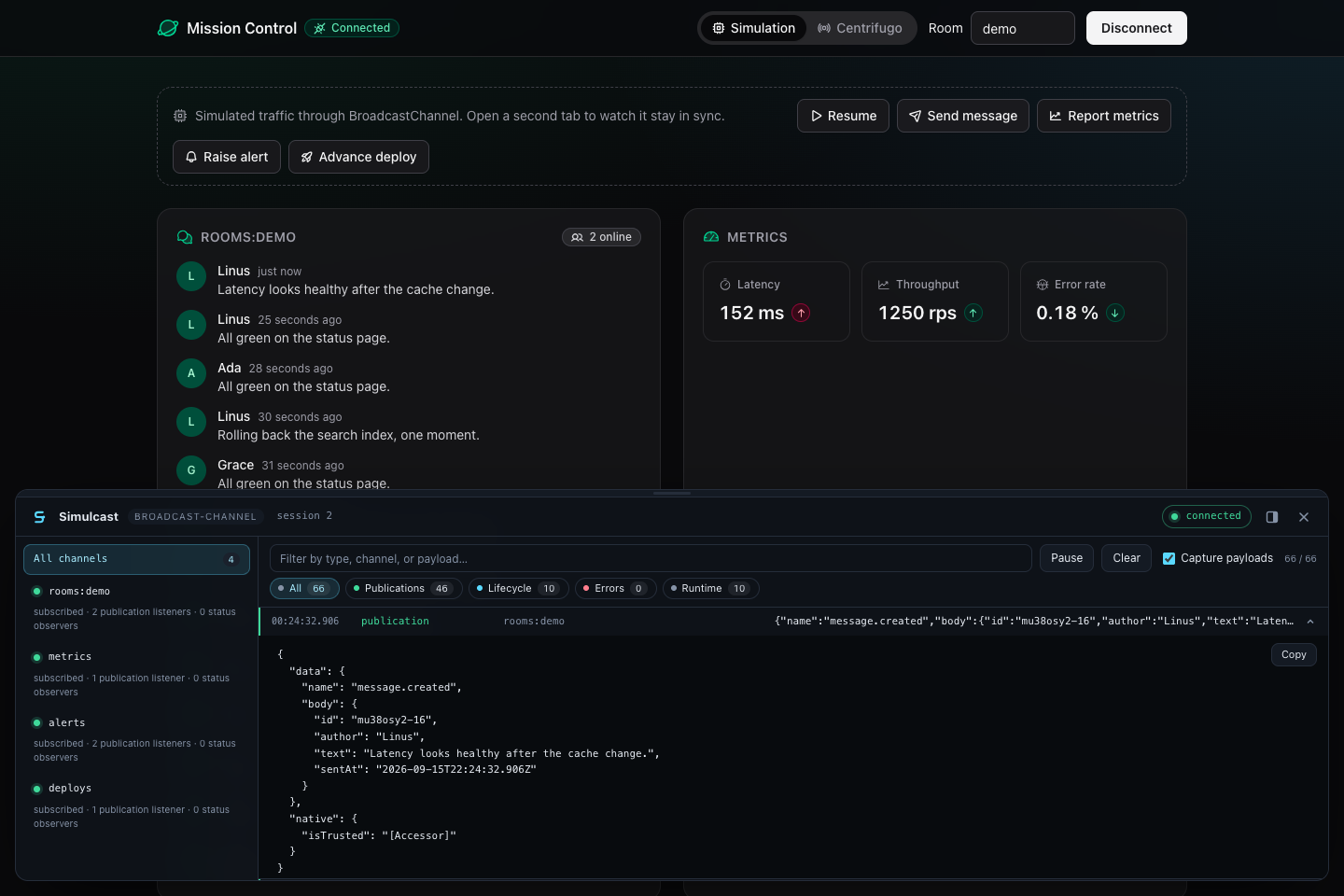
The Svelte wrapper uses attachments and requires Svelte >=5.29 <6. The core @priemskiyyy/simulcast-svelte binding supports Svelte >=5 <6.
Mount it
Each binding has a wrapper that reads the client from the nearest RealtimeProvider and mounts the inspector after hydration. Use your bundler's development flag; the examples use Vite.
import { SimulcastDevtools } from "@priemskiyyy/simulcast-devtools/react";

<RealtimeProvider client={realtime}>
  <App />
  {import.meta.env.DEV ? <SimulcastDevtools /> : null}
</RealtimeProvider>;<script setup lang="ts">
import { SimulcastDevtools } from "@priemskiyyy/simulcast-devtools/vue";
const isDevelopment = import.meta.env.DEV;
</script>
<template>
<RealtimeProvider :client="realtime">
<App />
<SimulcastDevtools v-if="isDevelopment" />
</RealtimeProvider>
</template>import { SimulcastDevtools } from "@priemskiyyy/simulcast-devtools/solid";
<RealtimeProvider client={realtime}>
<App />
{import.meta.env.DEV ? <SimulcastDevtools /> : null}
</RealtimeProvider>;<script lang="ts">
import { createDevtools } from "@priemskiyyy/simulcast-devtools/svelte";
const devtools = createDevtools();
</script>
<div {@attach devtools}></div>import { SimulcastDevtools } from "@priemskiyyy/simulcast-devtools";
const devtools = new SimulcastDevtools({ client: realtime });
devtools.mount(document.body.appendChild(document.createElement("div")));For Svelte, render the Inspector child beneath RealtimeProvider. Context must exist when createDevtools() runs during component initialization:
<script lang="ts">
  import { RealtimeProvider } from "@priemskiyyy/simulcast-svelte";
  import Inspector from "./Inspector.svelte";
  import App from "./App.svelte";
  import { realtime } from "./realtime";
</script>

<RealtimeProvider client={realtime}>
  <App />
  {#if import.meta.env.DEV}
    <Inspector />
  {/if}
</RealtimeProvider>
Every wrapper accepts initialIsOpen and maxEvents. The core class adds setClient(client) for applications that replace their client, and unmount(). Mounting a second time throws; recorded events survive an unmount and reappear on the next mount.
Inspect channels
The sidebar lists channels with registered listeners, including detached channels that only have status observers, with each channel's state, listener counts, and last error. Publication listeners create subscription demand; status observers watch it.
Selecting a channel filters the timeline to that channel plus connection events, since a disconnect usually explains a stuck subscription. Opening devtools never subscribes to a channel or keeps one alive.
Read the timeline
Rows are newest first and show the local time, the event type, the channel, and a summary: the reported state, the error message, the provider event name, or a payload preview once capture is on. Hovering a timestamp shows the UTC value.
Rows are coloured by kind: errors red, publications green, adapter state changes cyan, and the runtime's own session and channel lifecycle muted. The chips above the rows filter by one kind and show live counts. Expanding a row shows the full context with a copy button. When the panel is collapsed, the launcher turns red if an error arrives.
Record events
The timeline records while devtools is mounted, even when collapsed. Pausing or clearing affects only the inspector. Payload capture is off initially; enabling it records data for subsequent events with property names such as token, authorization, and password redacted. Contexts are copied into bounded text at capture time, so history retains no SDK objects. maxEvents is clamped to 1–1000.
Under StrictMode, React mounts the provider twice in development, so the first milliseconds show a session start, end, and start again.
Arrange the panel
The panel docks to the bottom edge by default. The dock button in the header moves it to the right edge, where it becomes a column. Drag the free edge to resize it, or focus the edge and use the arrow keys. Escape closes the panel and returns focus to the launcher. The open state, dock position, and size are stored in localStorage under @priemskiyyy/simulcast-devtools, so a reload restores them; initialIsOpen only applies on the first visit.
Custom integrations
The panel is built on client.diagnostics: cached get() snapshots, subscribe() change notifications, and events.subscribe() for adapter and runtime events. See Client.
Diagnose a missing message
- Check the channel has publication listeners. Status observers alone do not subscribe.
- Check its state. A connected session can still contain a rejected or retrying channel.
- Select the channel and inspect its latest error or state change.
- Enable payload capture, publish again, and expand the new publication.
- If the publication arrived but the UI did not change, inspect the parser and handler.
Capture is not retroactive. Redaction matches known property names and does not guarantee removal of every sensitive value; inspect copied context before sharing it.